Renew - Old Photo Restoration
- 4.6
- Rating
- 1.00M
- Installs
- Free
- Price

 Analysis by App-foxy
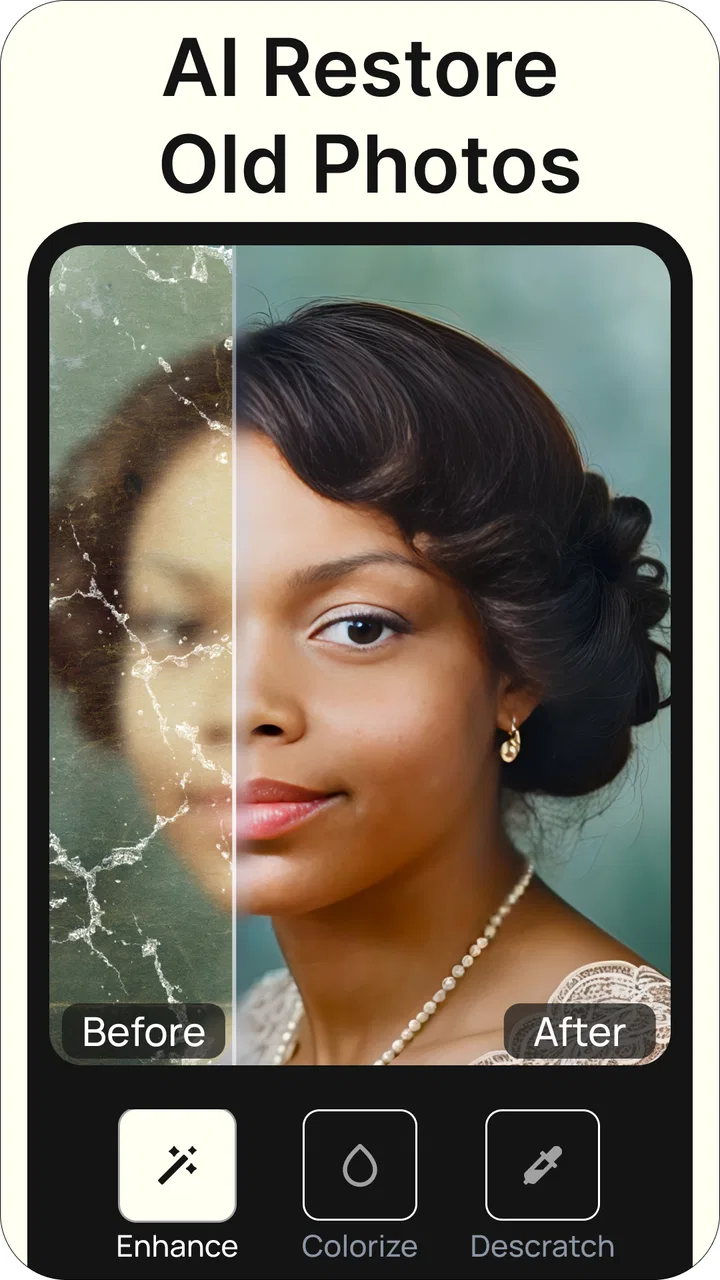
I approached Renew - Old Photo Restoration as the sort of photography app you open when a damaged family picture matters more than perfect technical control. Its focus is practical: bringing attention back to faded images, adding color to monochrome pictures, repairing visible damage, combining photos, and creating a little movement from still memories. In my experience, that makes it more interesting than a basic filter app, but also more dependent on the quality and character of the original image.
The app is developed by Olena Dorohan and sits in the photography category. It is free to install, which makes trying the workflow relatively easy, while optional in-app purchases range from $9.99 to $49.99 per item. That distinction matters here: the free entry point is useful for deciding whether the results suit your pictures, but anyone planning a large restoration project should think carefully about the paid value before committing.
How Renew handles old photos in everyday use
The first thing I like about this kind of tool is that it removes the intimidating part of restoration. Traditional editing software can make you think about layers, masks, cloning, color curves, and export settings before you have even repaired one crease. Renew presents the idea in a much more approachable way. You start with a photograph, choose the kind of help it needs, and let the app’s artificial intelligence do much of the visual interpretation.
You May Also Like

 Blood Strike: 2.5 Anniversary
Blood Strike’s Loadouts Turn Every Drop Into a Tactical Gamble
A close look at Blood Strike’s custom loadouts: how fast access to signature weapons reshapes its battle royale rhythm, rewards preparation, and narrows the gap between fights.

 Pandora - Music & Podcasts
Pandora’s Music Is Easy to Start, but Harder to Recover
Pandora’s strength is its low-effort path from a seed to a station. Its weak spot is how much confidence it asks you to place in connection, setup, and quiet recovery.

 8 Ball Pool
 Is Built on Rivalries, Rematches, and Routine
A close look at the rivalries, rematches, shared routines, and unanswered safety questions that turn a quick pool match into a persistent mobile community.

 Samsung Music
’s Quiet Strength Is Playing What You Already Own
Its reach comes less from spectacle than from dependable access to a personal library. That simplicity is both the app’s strongest retention engine and its ceiling.

 AccuWeather: Weather Radar
AccuWeather Review: A Quick, Clear Forecast for Everyday Decisions
For everyday plans, the best forecast is the one you can understand quickly. AccuWeather makes rain timing, radar, and local conditions easy to act on, with a few trade-offs.

 Hill Climb Racing
Why Hill Climb Racing Still Turns Crashes Into One More Run
A tiny car, a bumpy hill and one more upgrade: Hill Climb Racing keeps resurfacing because its simple chaos makes every near-miss feel personal.
More From Our News Desk



That approach is especially helpful for people who want a keepsake rather than a technically perfect archive scan. A family member may have a portrait stored in a drawer, a school photograph may have scratches across a face, or an old snapshot may have lost contrast over time. In those cases, the goal is usually to make the image pleasant to look at again. Renew is aimed directly at that emotional, everyday use.
The restoration tools are not all doing the same job. Repair is most useful when the problem is physical-looking damage such as marks, worn areas, or distracting defects. Colorization serves a different purpose: it interprets a black-and-white image and creates a plausible color version. Combining photos can help when you want several people or moments presented together, while animation adds a more playful presentation to a still image.
The important distinction is that Renew creates an interpretation, not a time machine. A repaired face can look cleaner without being historically exact, and an automatically colorized image may choose shades that feel natural while still being guesses. I would use the finished result as a restored presentation copy and keep the untouched original safely stored.
Where the app feels most useful
For a quick personal project, the workflow is much less demanding than opening a desktop editor. Imagine finding a faded photograph of a grandparent before a family gathering. You can photograph or select the image, try a restoration pass, inspect whether the face and clothing remain believable, and then decide whether the result is worth sharing. That is a sensible use of Renew because the app gives you a fast way to explore the possibility without requiring editing experience.
It is also a good fit for social sharing. A repaired image can be easier to show in a family chat, and a colorized or gently animated version may encourage relatives to talk about the person or place in it. The combination feature has a similar appeal when you want to place related pictures together instead of sending several separate files.
Another useful workflow is to make two versions of important images. I would first preserve the original scan or camera capture, then create a conservative repaired version, and only after that experiment with color or animation. This order prevents a creative effect from becoming the only copy you have. It also makes comparison easier, particularly when artificial intelligence changes small facial details.
What the artificial intelligence gets right—and where it guesses
AI restoration is strongest when the photograph still contains enough visual information to work with. Clear outlines, recognizable faces, and moderate fading give the system something to interpret. When a picture is severely blurred, heavily torn, or missing large areas, the result can become more imaginative than restorative. That is not necessarily a flaw in the app; it is a basic limitation of reconstructing information that is no longer present.
I would pay close attention to eyes, teeth, hair, fingers, lettering, and patterned clothing. These areas can look convincing at a glance but change under closer inspection. If the image is a historical record, those details may matter more than overall smoothness. For a casual family post, a slightly idealized result may be acceptable. For documentation, genealogy, or legal evidence, I would not rely on an AI-generated reconstruction as the authoritative version.
Colorization deserves the same caution. It can make an old portrait feel immediate and accessible, but the colors are inferred rather than recovered from the original black-and-white file. A blue coat, brown table, or green outdoor scene may look believable without being known to be correct. I see this feature as a creative visualization, not a factual restoration.
Animation can be charming when used lightly, especially for a portrait intended to surprise relatives. It can also change the mood of a photograph. A still expression that feels dignified may seem artificial once motion is introduced. I would preview animated results carefully and choose them for informal sharing rather than for preserving the character of an important archival image.
Small decisions that improve the final result
The quality of the source matters more than many new users expect. If you are digitizing a printed photo, use even lighting and avoid glare before bringing it into Renew. A straight, sharp capture gives the restoration process better material than a crooked picture taken under a ceiling lamp. Cleaning dust from the physical print and the phone lens can also prevent the app from treating avoidable specks as part of the image.
Do not automatically choose the most dramatic treatment. For a portrait with a few scratches, repair alone may look more trustworthy than combining repair, colorization, and animation in one pass. I prefer to add effects one at a time, compare the result with the original, and stop as soon as the image feels clearer. This is one of the easiest ways to avoid an overprocessed face or a result that looks more like a generated picture than a restored one.
For group photographs, inspect each person separately. AI tools often handle the central subject more confidently than a small face near the edge of the frame. If one relative looks noticeably different after processing, the overall image may feel wrong even when the background has improved. In that situation, a modest restoration is usually better than chasing a perfectly clean result.
Text is another reason to be conservative. Old postcards, certificates, signs, and handwritten notes may contain marks that look like damage but are actually meaningful letters. I would preserve a high-quality untreated copy and avoid assuming that a repair pass has retained every character accurately. Renew is more naturally suited to visual memories than to exact document recovery.
Cost, free access, and what paid value means here
Renew is free to install, so the initial decision is not whether to buy a complete editing package before seeing it. You can begin by assessing whether its style of restoration works for your own photos. That is a meaningful advantage over a tool that requires an upfront purchase simply to discover that its interpretation of faces or colors is not to your taste.
There are optional purchases priced from $9.99 to $49.99 per item. I would treat those as a project decision rather than an automatic upgrade. If you only want to rescue one or two sentimental pictures, the free experience may be enough to judge whether the app deserves further spending. If you have boxes of photographs to process, the higher possible outlay becomes more important, and you should consider how many images you realistically expect to finish.
The value is strongest when convenience matters more than detailed manual control. Paying for a guided AI workflow can make sense if it saves you from learning a desktop editor or hiring someone for simple personal images. It is less compelling if you already know how to use professional restoration software and need exact control over every repaired area, color decision, and export step.
I would also avoid judging the purchase only by the most impressive preview. The real question is whether the app repeatedly produces results you would actually keep. Test it on different kinds of pictures: a face, a group, a damaged background, and a black-and-white image. A tool that succeeds on one ideal portrait but struggles with the rest of your collection may not offer good value for a larger project.
How it compares with ordinary photography alternatives
Compared with a standard photo editor, Renew is more specialized and less technical. A conventional editor gives you control over brightness, contrast, cropping, retouching, and color adjustments, but it may leave you to repair damage manually. Renew’s appeal is the opposite: it tries to make the difficult reconstruction step accessible through automation.
Compared with a dedicated desktop restoration program, it is likely to appeal more to speed and simplicity than to precision. Desktop tools are better suited to someone who wants to work slowly, zoom into individual defects, preserve historical accuracy, and make a repeatable record of every change. Renew is more comfortable for a person who wants to see a useful result without turning a family photo into a technical project.
It also differs from ordinary social media filters. Filters mainly change the mood or appearance of an already usable image. Renew is aimed at photographs that need repair, interpretation, or a new presentation. That makes it more relevant to old albums and family archives, although the AI nature of the output means you should inspect it more critically than a simple brightness adjustment.
For combining images, a basic collage maker may be preferable when you need exact placement, borders, captions, or a carefully designed layout. Renew’s advantage is keeping the process connected to restoration and creative treatment. If your goal is a polished scrapbook page or a precise poster, a dedicated layout app will probably give you more control.
Who will get the most from Renew
I would recommend it first to casual photographers, families digitizing old albums, and people who want to make neglected pictures shareable. It is especially approachable if you do not already use editing software. The combination of repair, colorization, photo composition, and animation gives you several ways to revisit the same image, rather than limiting the app to one narrowly defined correction.
It can also suit someone preparing a small personal gift or family presentation. A colorized portrait can be a thoughtful way to help younger relatives connect with an older photograph, while a carefully chosen animated version may work as a lighthearted digital greeting. In both cases, I would present the result as an artistic enhancement, not claim that every reconstructed detail is authentic.
People who should skip it are those who require archival precision, professional retouching control, or guaranteed fidelity to original colors and facial details. It is also not my first choice for repairing documents, logos, fine artwork, or photographs where tiny details carry factual importance. A manual editor or specialist restoration service is better in those situations.
Users with very large collections should think about workflow before paying. AI can make individual images faster, but reviewing every output still takes time. If you need consistent treatment across hundreds of photographs, manual organization, naming, backup, and quality checking may matter more than the initial restoration button. Renew can help with the creative step, but it does not remove the responsibility of managing your archive carefully.
Device fit and practical expectations
The app supports devices running Android 7.0 or later, which gives it a broad compatibility range for Android users with older phones. Its current version is 1.1.21, and the app is marked suitable for Everyone. Those details make it approachable for a household where not everyone has the newest device or the same level of technical confidence.
Even with broad operating-system support, the experience can vary with the phone itself, especially for image processing. I would keep the original photos backed up before experimenting and avoid deleting a source image simply because a new version looks cleaner. That habit is useful with any restoration tool, but it is particularly important when the app is making visual decisions on your behalf.
The app has reached over 500 thousand installs, with an average rating of 4.6 from around 15 thousand ratings and roughly 1.2 thousand written reviews. Those figures suggest that many people find the concept worthwhile, but they should not replace testing your own photographs. Restoration quality depends heavily on source condition, subject type, and how much alteration you are willing to accept.
My buying decision after using the workflow
My view is favorable, with a clear boundary. Renew is a convenient first stop for personal photo restoration when I want a fast, friendly way to make an old image look alive again. The free installation lowers the risk of trying it, and the range of treatments gives the app more personality than a simple repair utility.
I would not spend on the most expensive option merely because an AI preview looks impressive. I would first test representative photos, compare every result with the untouched originals, and decide whether the improvement is consistent enough to justify the purchase. The optional prices make sense only when the saved effort and emotional value outweigh the cost for your particular project.
For a family album, casual sharing, or a creative before-and-after experiment, I think Renew is worth trying. For historical preservation, exact color recovery, detailed document work, or professional retouching, I would choose a more controllable alternative. In short, Renew is best when convenience and emotional impact matter more than forensic accuracy. That is a useful niche, and the app serves it well as long as you keep the original image and treat AI results as enhanced interpretations rather than unquestionable truth.
FAQs for Renew - Old Photo Restoration
01What is Renew - Old Photo Restoration, and how does it work?
Renew - Old Photo Restoration is an app designed to bring your old, faded, or damaged photos back to life. Utilizing advanced AI algorithms, the app scans and analyzes your images, automatically enhancing colors, removing scratches, and restoring details to make your photos look as good as new.
02Is Renew - Old Photo Restoration easy to use for beginners?
Yes, Renew - Old Photo Restoration is designed with user-friendliness in mind. With a simple interface and step-by-step guidance, even those with no prior photo editing experience can easily restore their old photos. The app provides intuitive tools and automated processes to ensure a smooth user experience.
03Does Renew - Old Photo Restoration support all image formats?
While Renew - Old Photo Restoration supports most common image formats like JPEG, PNG, and TIFF, it's always best to check the app's specifications for any format limitations. This ensures that your photos can be successfully uploaded and restored without any issues.
04Are there any in-app purchases or subscriptions required for full functionality?
Renew - Old Photo Restoration offers a free version with basic features, but for advanced tools and unlimited usage, a subscription or one-time purchase may be required. It's advisable to review the app's pricing structure to understand what features are included in the free version versus the premium options.
05Can I share restored photos directly from the app?
Yes, Renew - Old Photo Restoration typically includes sharing options that allow you to post your restored images directly to social media platforms or send them via email. This feature makes it easy to share your revitalized memories with friends and family quickly and conveniently.
Pros
- Restores color and clarity efficiently.
- User-friendly interface for quick edits.
- Supports various image formats.
- Fast processing with minimal lag.
- No watermarks on restored images.
Cons
- Limited free version features.
- Occasional glitches on older devices.
- Requires internet for full functionality.
- Subscription model can be pricey.
- Ads can interrupt workflow.

Renew - Old Photo Restoration
Gallery